Data export and archiving
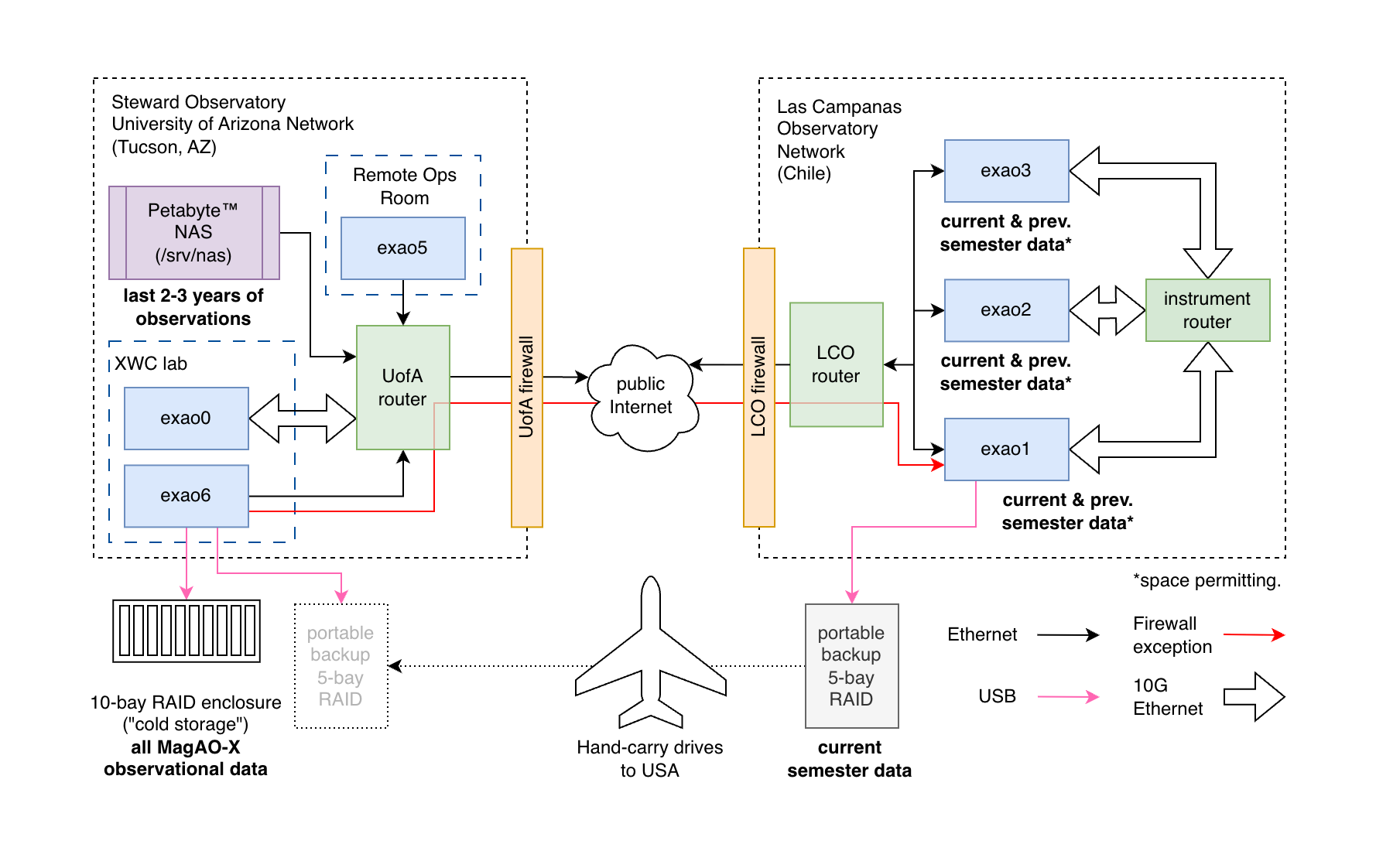
Schematic representation of the connections between our computers and which data live where
Fresh observations are picked up by a background process called lookyloo on exao1/AOC and converted to FITS with appropriate headers using xrif2fits, which has access to all the files the instrument has just saved.
Easy mode
If the observation is recent, and you are only looking for camsci1 and camsci2 data, they will already be in /home/guestobs/obs on exao1. You can download the observation from there following the instructions in Accessing data as a guest observer.
Exporting another stream from a recent observation
Only camsci1 and camsci2 get automatically exported, but there are other streams you could save while observing. To export those with xrif2fits you have two options: invoke xrif2fits directly, or use the lookyloo command-line interface.
The available options are documented in the help:
jlong@exao1:~$ lookyloo -h
usage: lookyloo [-h] [-r] [-i] [-C] [-S] [-v] [-t TITLE] [-o OBJECT]
               [-e OBSERVER_EMAIL] [-p] [--find-partial-archives] [-s SEMESTER]
               [--utc-start UTC_START] [--utc-end UTC_END] [-c CAMERA]
               [-X DATA_ROOT] [-O] [--ignore-data-integrity] [-D OUTPUT_DIR]
               [--xrif2fits-cmd XRIF2FITS_CMD] [-j PARALLEL_JOBS]

Quicklookyloo

options:
-h, --help            show this help message and exit
-r, --dry-run         Commands to run are printed in debug output (implies
                        --verbose)
-i, --ignore-history  When a history file (.lookyloo_succeeded) is found under
                        the output directory, don't skip files listed in it
-C, --cube-mode-all   Whether to write all archives as cubes, one per XRIF,
                        regardless of the default for the device (implies --omit-
                        telemetry)
-S, --separate-mode-all
                        Whether to write all archives as separate FITS files
                        regardless of the default for the device
-v, --verbose         Turn on debug output
-t, --title TITLE     Title of observation to collect
-o, --object OBJECT   Object name
-e, --observer-email OBSERVER_EMAIL
                        Skip observations that are not by this observer (matches
                        substrings, case-independent)
-p, --partial-match-ok
                        A partial match (title provided is found anywhere in
                        recorded title) is processed
--find-partial-archives
                        When recording starts after stream-writing, archives may be
                        missed. This option finds the last prior archive and
                        exports it as well.
-s, --semester SEMESTER
                        Semester to search in, default: 2026A
--utc-start UTC_START
                        ISO UTC datetime stamp of earliest observation start time
                        to process (supersedes --semester)
--utc-end UTC_END     ISO UTC datetime stamp of latest observation end time to
                        process (ignored in daemon mode)
-c, --camera CAMERA   Camera name (i.e. rawimages subfolder name), repeat to
                        specify multiple names. (default: ['camsci1', 'camsci2'])
-X, --data-root DATA_ROOT
                        Search directory for telem and rawimages subdirectories,
                        repeat to specify multiple roots. (default: ['/opt/MagAOX',
                        '/srv/icc/opt/MagAOX', '/srv/rtc/opt/MagAOX'])
-O, --omit-telemetry  Whether to omit references to telemetry files
--ignore-data-integrity
                        [DEBUG USE ONLY]
-D, --output-dir OUTPUT_DIR
                        output directory, defaults to current dir
--xrif2fits-cmd XRIF2FITS_CMD
                        Specify a path to an alternative version of xrif2fits here
                        if desired
-j, --parallel-jobs PARALLEL_JOBS
                        Max number of parallel xrif2fits processes to launch (if
                        the number of archives in an interval is smaller than this,
                        fewer processes will be launched)
The only reason to use lookyloo is that it knows how to read telemetry from observers, the INDI device that starts and stops observations. So, it can group your FITS files by the configured observation observer, time, target, and name.
If you already know which .xrif files you need, you should use xrif2fits directly.
Example command for lookyloo: Suppose you want to export camsci1 and camwfs data from an observation in 2025B named something containing betaPic (but you can’t remember the exact title):
lookyloo -c camsci1 -c camwfs -t betaPic -p -s 2025B
If you’re on exao1, and it’s still the 2025B semester (or close enough), this command will “just work” and create a folder tree with the correct structure in whatever directory you ran it from.
After older data have been moved, you will need to supply --data-root (-X for short) arguments for all the places relevant files may be found. See the next section.
Exporting from the archive
Accessing archival data is a bit more complicated than fresh observations.
After the files have been uprooted from the instrument and moved to long-term storage, you will need to identify the most likely home for your image data. From the above diagram, /srv/nas is a good bet for recent data. Otherwise you will need to connect to exao6 and run the export from there.
Ensure you have (or have access to) an up-to-date version of the MagAO-X C++ software and lookyloo tool. The xrif2fits tool depends on the telemetry subsystem to look up header values, and that can get updated with new types of telemetry. (The one on the instrument is kept up-to-date by necessity, but the same is not true of other installs.)
In this example, the hand-carried backup drive is connected via USB and mounted at /mnt/backup. The backup is organized by role (aoc, rtc, icc) and the MagAO-X data roots for each instrument computer are within:
$ ls /mnt/backup/aoc/opt/MagAOX
cacao  calib  logs  rawimages  telem
So in this case, you would include --data-root /mnt/backup/aoc/opt/MagAOX in your lookyloo command. However, this will only be enough to find the observers telem (saved on AOC). You will also need --data-root /mnt/backup/rtc/opt/MagAOX and --data-root /mnt/backup/icc/opt/MagAOX to ensure you get all relevant headers populated.
To update the above example:
lookyloo -c camsci1 -c camwfs -t betaPic -p -s 2025B \
   --data-root /mnt/backup/aoc/opt/MagAOX \
   --data-root /mnt/backup/rtc/opt/MagAOX \
   --data-root /mnt/backup/icc/opt/MagAOX
(the \ lets us break up the command over multiple lines)