Taking Flats
Flats can be taken when MagAO-X is on the telescope, using either the flat-field screen or using the twilight sky. stageff deploys a field stop
which is just slightly smaller than the camsc1/2 FOV in order to produce an accurate flat.
The telescope will need to have the mirror covers open. If using the sky the dome will need to be open and the sky relatively bright, i.e. shortly after sunset. Talk to your awesome TO to make sure they know you want to do this.
See below for flat-field screen use.
Configuring MagAO-X
place MagAO-X in lab mode
place
stagepickoffin thetelpositionthe DMs should have flats set, but otherwise the alignment and wavefront quality is unimportant
power on
stageff, and place it in theinposition (use stageGUI stageff)configure
stagescibs,fwsci1andfwsci2as neededopen shutters on
camsci1andcamsci2, adjust exposure time and/or EM gain until you see lightnow adjust the position of
stageffuntil the left edge of the field stop is on the left edge ofcamsci1you may need to ask a MagAO-X ninja to manually adjust the y-position of the mask to center it on
camsci1adjust exposure time to maximize counts without saturating
take data
take darks
Using the Flat-Field Screen
The flat-field screen is installed on the secondary truss, and deploys in front of M2. It can then be illuminated with a selection of lamps.
Arrange to have the mirror covers open. Upon request the TO will re-open them after stowing the telescope for the day.
On the observer computer, there is small gui (shown below). Select
Deployin the FF-Screen drop downWalk out into the dome and verify it is in.
Once it is in, select the lamp by pressing its button. We normally use
Qhfor maximum flux, butNeis pretty.Set up MagAO-X and take data as above.
When you are done, turn off the lamp and retract the screen.
The mirror covers will be closed by the day crew. Go to bed.
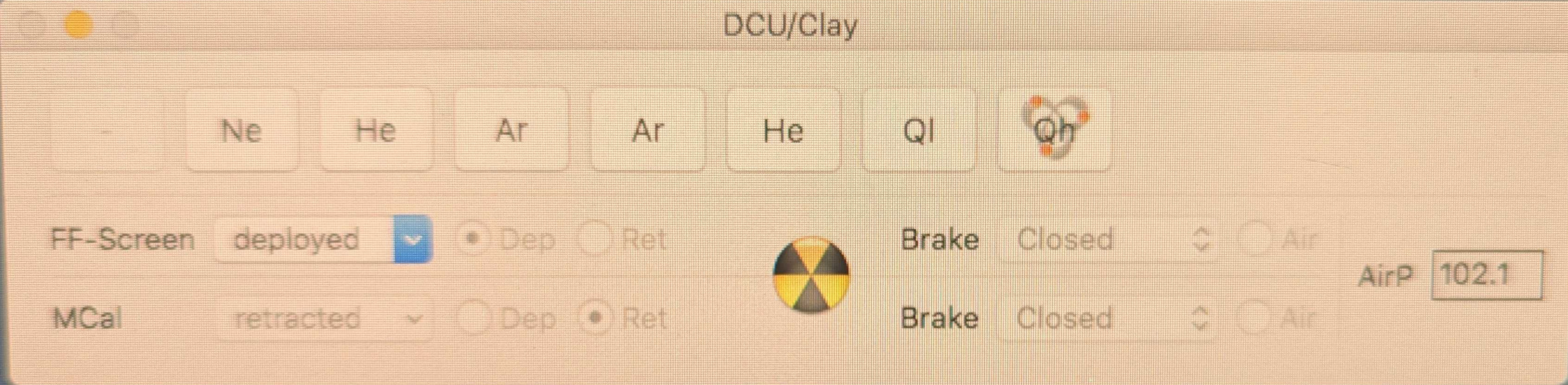
The flat-field screen operation gui. This shows the screen deployed and the Qh lamp on.